VI Properties Editor


VI Properties Editor is a LabVIEW tool that allows the user to mass edit VI properties and documentation by loading a folder, project, library, or class. It began with a simple desire to be able to press Ctrl+B to add bold tags when editing VI documentation.
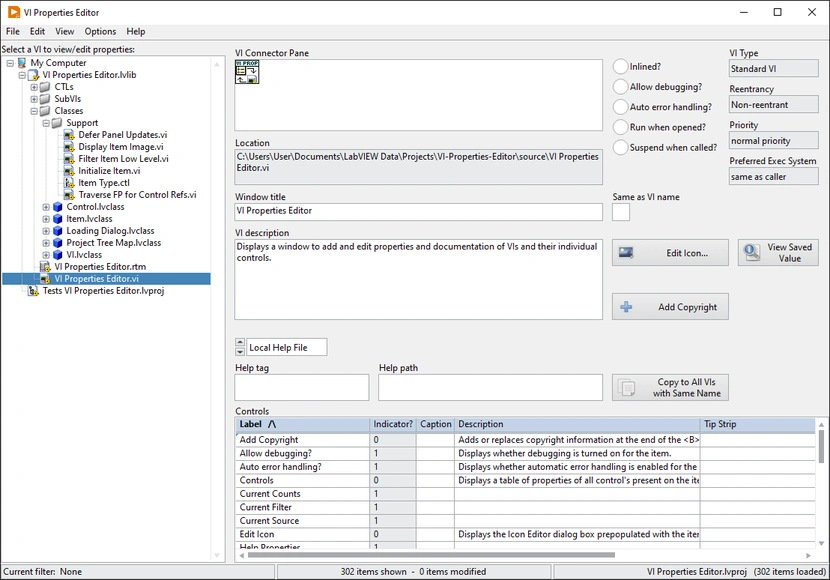
Features
- Press Ctrl+B to add bold tags to VI Description; press Ctrl+Shift+B to remove nearest tags
- View VI Description formatted so that bold tags become bold text
- View all controls or only controls on the connector pane
- Perform mass replacements on various properties
- Copy a VI’s properties to all other VIs with the same name
- Add or edit copyright info for all VIs or one-by-one
- Filter and sort VIs by custom filters that can leverage regular expressions
- Filter on saved data or edited data
- History of last 10 folders selected kept in File → Recent Folders
- History of last 10 projects/libaries/classes selected kept in File → Recent Files
- History of last 10 custom filters used kept in View → Recent Filters
- Optional confirmation dialogs for various high-risk actions
Properties of VIs that can be edited:
- Window Title
- Same as VI name?
- VI Description
- VI Icon
- Help Path
- Help Tag
- Help URL
- Help Type
- Control names (labels)
- Control captions
- Control descriptions
- Control tip strips
Requirements
- LabVIEW 2020 or newer
- VI Package Manager
Getting started
- Download and install the latest version of the tool. It can be found by searching for it on VI Package Manager. It can also be found on vipm.io and in the Releases section of the repository.
- After being installed, it is integrated into the LabVIEW development environment and can be launched by clicking Tools → Redhawk → VI Properties Editor in any LabVIEW window.
Support
At the time of writing, this project is actively maintained. If you find a bug or have a suggestion for an improvement, create an issue on GitHub.
Contributing
If you find this tool useful, please consider starring the VIPM package and Github repository to show your support. If you would like to contribute directly, fork the develop branch of the repository and open a pull request.